Orange County Indexed has several parts that work together: a search of books and archives, a chronology of dated events, pages for people, places, buildings and themes, maps, county records and the library's own shelves. This page shows each one, what its controls do, and a tip for getting more out of it. The worked guides link here when they use a feature.
Explore
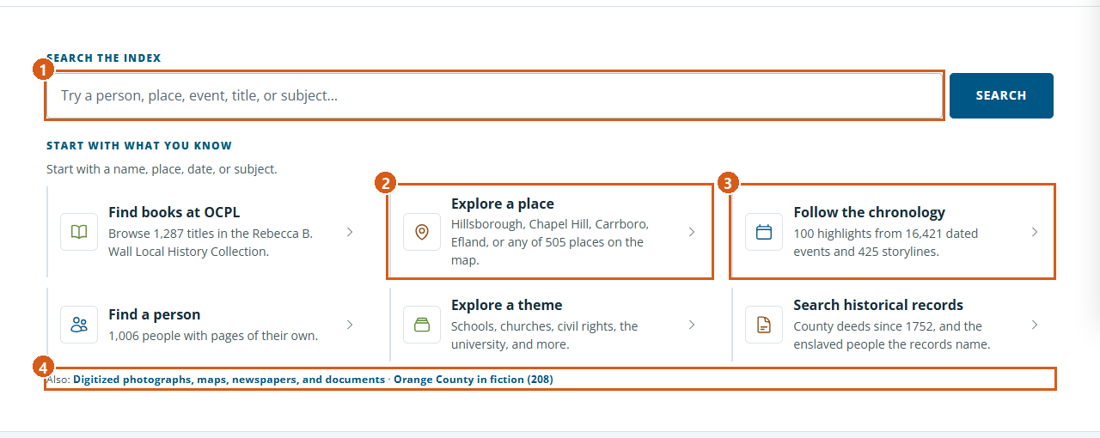
Explore is the front page. The "Search the index" box sends your words to Search Indexed Records, and the routes under "Start with what you know" open the parts of the index by what you already have: a place, a date, a person, a theme, a record, or a book at OCPL.
The bar of links at the top of every page (Explore, People, Places, Themes, Chronology, Search Indexed Records, At OCPL, Use OCPL Resources, Research Guides) gets you anywhere else.
"On this day" lists events from today's date in earlier years; "All entries on this date" opens every one in the chronology. "By period" opens the chronology at one of seven periods.
The featured people, stories and themes change every day, so the page is worth a second look.
Numbered on the screenshot: 1 Search the index · 2 Explore a place · 3 Follow the chronology · 4 Digitized sources and fiction.
Search Indexed Records
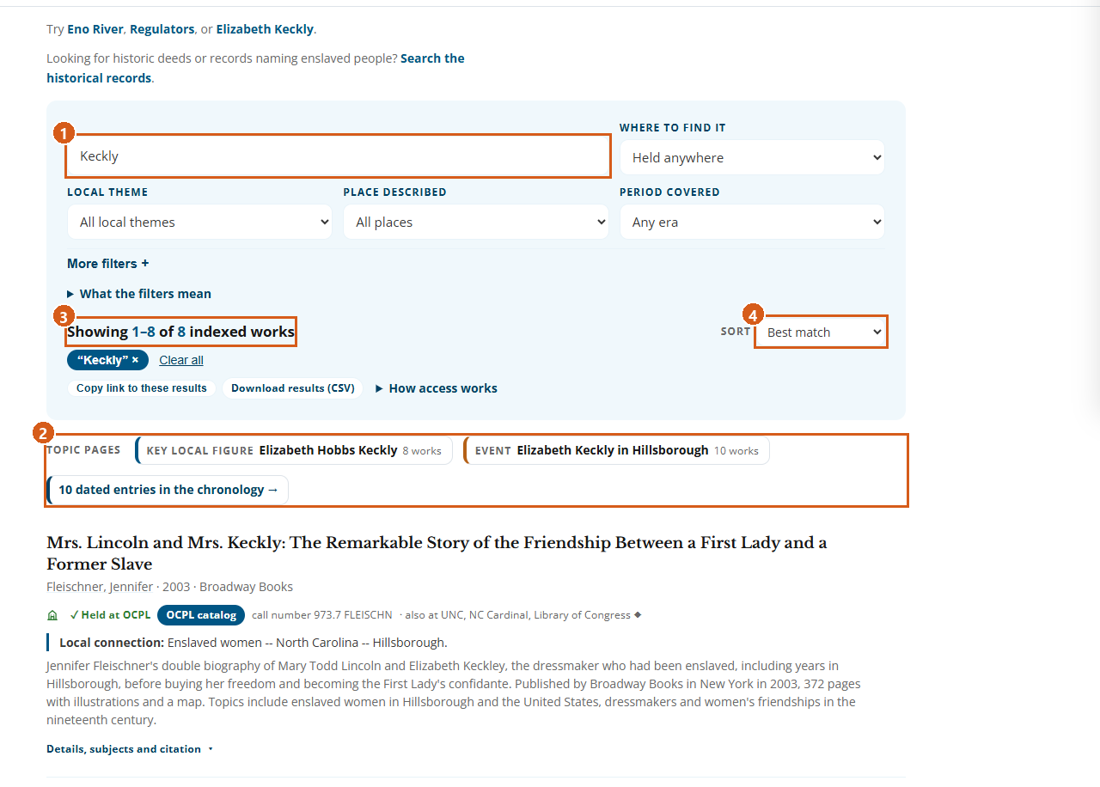
Search Indexed Records searches the whole index of books, articles, archival collections, government documents and digitized sources. Every word you type must appear somewhere in a work's title, author, description, notes or subject headings; small words are ignored, and known variants count as one word (Keckly and Keckley, Hillsboro and Hillsborough).
Filters: "Where to find it", "Local theme", "Place described" and "Period covered" sit beside the box; "More filters +" adds catalog category, named events, format, the original subject headings, and which kinds of records to include. Filters work together. Each option shows how many results it would return with your current filters. Remove an active filter by selecting its chip.
"Period covered" is the period a work is about, not the year it was published; for publication dates use the date range under "Works over time".
A result card links its title to the best record (the OCPL catalog first), gives one access line ("✓ Held at OCPL", "Read online", "Find a library" and so on), and folds out "Details, subjects and citation" with "Cite" and "Report an error".
When your words name a person, place, event or theme with its own page, a "Topic pages" row appears above the results.
Background books from the Rebecca B. Wall Local History Collection are kept apart from the index results: the page offers them when they would help, and "More filters +" can include them.
"Copy link to these results" copies the address of the search, so you can share or return to it.
Numbered on the screenshot: 1 Search box · 2 Topic pages · 3 Result count · 4 Sort.
The chronology
The chronology opens on 100 highlights. "Show the full chronology" switches to every dated event and storyline, and any search or filter looks through the full set, not only the highlights.
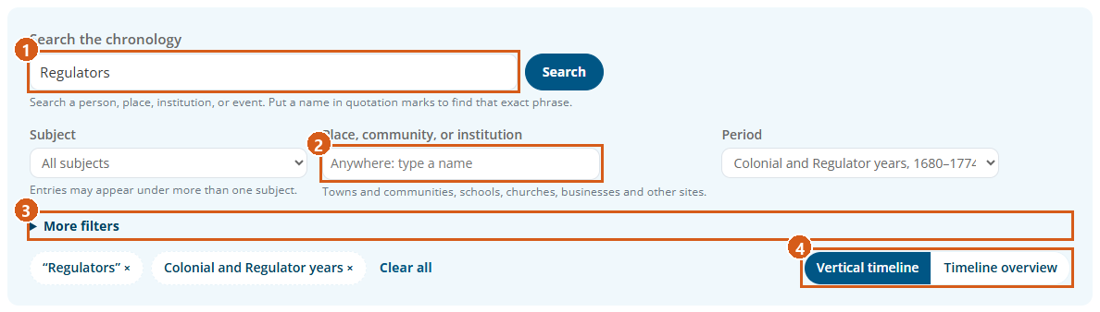
Combine "Search the chronology" with "Subject", "Place, community, or institution" (it suggests names as you type, other names included) and "Period"; "More filters" adds kind of entry, month and a year range. Quotation marks find an exact phrase. Each option shows how many entries it would return with your other choices, and "Clear all" starts over.
Switch views at any time: "Vertical timeline" runs the cards down the page under period and decade headings; "Timeline overview" lays them along a horizontal strip with decade bars to jump. Long lists come 200 to a page, and "Jump to a decade" reaches any page.
A storyline card gathers related events into one history ("Storyline · N events"), with "The full story" to unfold it; an event that belongs to one says "Part of" it.
To find everything about one person, use "See these dated events in the chronology" on the person's page; there is no person menu on the chronology itself.
Numbered on the screenshot: 1 Search the chronology · 2 Place, community, or institution · 3 More filters · 4 Vertical timeline or Timeline overview.
People
The People directory lists everyone with a researched profile. Search a name, a pen name or a word from a biography, or start from "Popular starting points"; "Orange County figures" and "Everyone" switch between local people and the state and national figures in the county's story.
A name can appear in three ways, and it helps to know which you are looking at:
A researched profile opens on a biography with its source, and has a card in the directory.
A catalog page exists because a library catalog names the person. It has no biography. Pages with only one or two indexed works say so.
An index mention is a name printed in a chronology entry. The names index lists it as written, with links to the entries that name it; there is no page. In the names index, a name shown as a link has a page.
Other names and namesakes:
"Also printed as" (names index) and "Also found in catalogs as" (person pages) show the other forms of a name. Search each spelling on its own.
Records are not merged on a shared name. The names index says when an entry's name "may name another person, or one not yet identified", and "May be the same person as" points between forms that could be one person. Check dates, places and family before you accept a match.
On a person page, each dated event lists the other people it names, and "People named in the same events" ranks who shares the most entries. A shared entry shows people in the same event, not how well they knew each other.
Numbered on the screenshot: 1 Not linked to the page of the same name · 2 A name with a page · 3 Also printed as.
Places
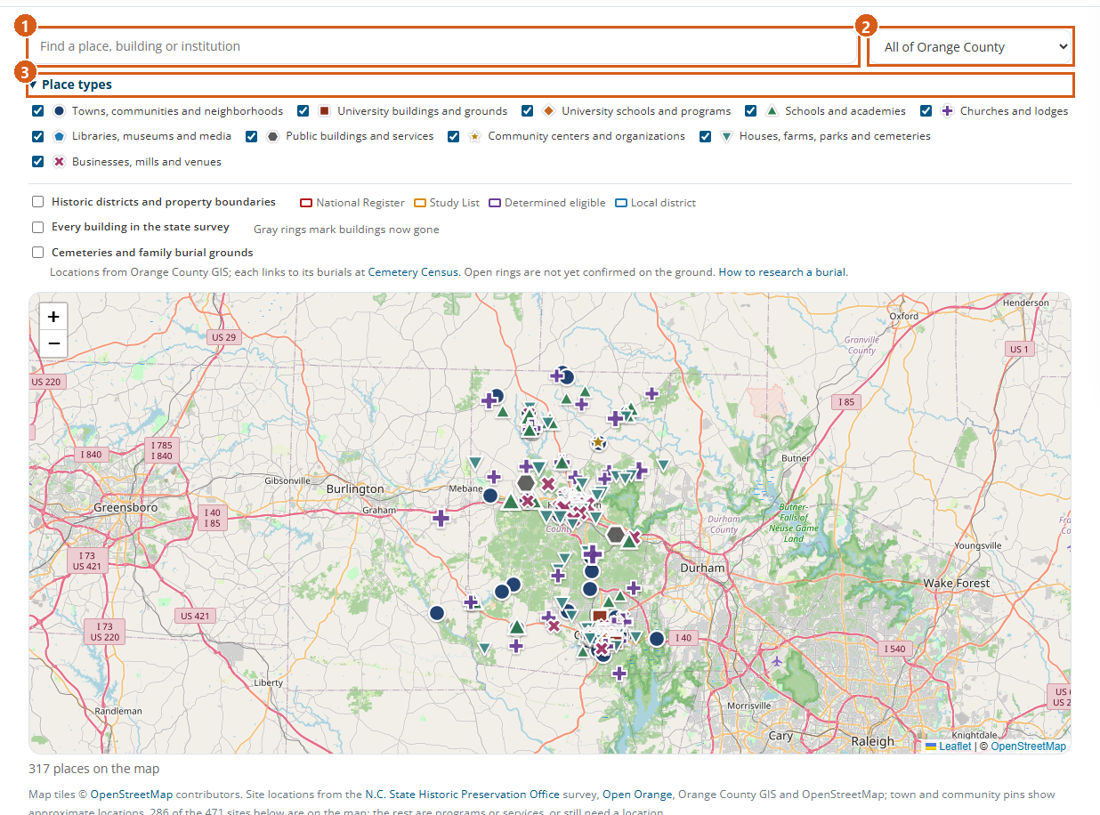
Places puts the county's towns, communities, rivers and sites on one map, with lists below it. "Find a place, building or institution" narrows the map and the lists as you type, and the town menu keeps one town or community and its sites.
Towns, communities and landscapes have place pages: their dated events and storylines, dated maps of the place, indexed works and research sources.
Buildings and institutions have site pages: an "At a glance" box (kind, state survey designation, address, the years its events cover), the people in its history, works about it, deeds that name it, and nearby sites.
Places in the chronology lists every building, business, street and spot the entries name twice or more, like the index of a book. A place with a page is a link; any other place lists the entries that name it, with "Also printed as" and notes from dated maps. "Streets" lists street addresses under each street.
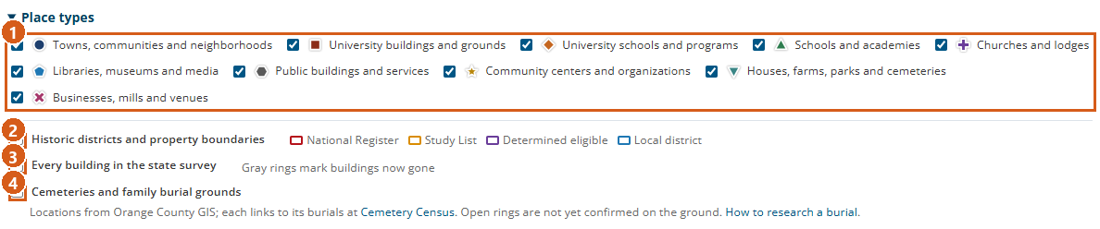
Numbered on the screenshot: 1 Find a place · 2 Town or community · 3 Place types.
Maps
Every map in the index works the same way: + and − zoom, dragging moves, and the scroll wheel zooms only after you click the map once, so the page scrolls past it normally. Click a pin, outline or dot for its details.
Layers: on the Places page, open "Place types" and select or clear each kind of place. Three extra layers load when you select them: "Historic districts and property boundaries" (outlines colored by status: National Register red, Study List orange, determined eligible purple, local district blue), "Every building in the state survey" (a dot per surveyed building), and "Cemeteries and family burial grounds". Site pages carry the same three layers.
Markers: each kind of place has its own color and shape (a navy circle for towns, a purple plus for churches, a magenta X for businesses and mills, and so on), and bigger symbols have more dated events. The legend under "Place types" draws them.
Approximate locations: town and community pins show a general location, not a boundary or a center. Open rings on the cemetery layer are not yet confirmed on the ground, gray rings on the survey layer are buildings now gone, and a cemetery point marks the cemetery, not a grave. A site page's "Map" line says where its pin comes from, and a few pins stand for something else (the Eagle Hotel pin marks Graham Memorial, built on its site).
The Orange County page has "The county's shape through time": click a date to see the county's outline then, with its other shapes dashed. Check it before searching a neighboring county's records.
Numbered on the screenshot: 1 Kinds of place · 2 Historic districts and property boundaries · 3 Every building in the state survey · 4 Cemeteries and family burial grounds.
Themes and storylines
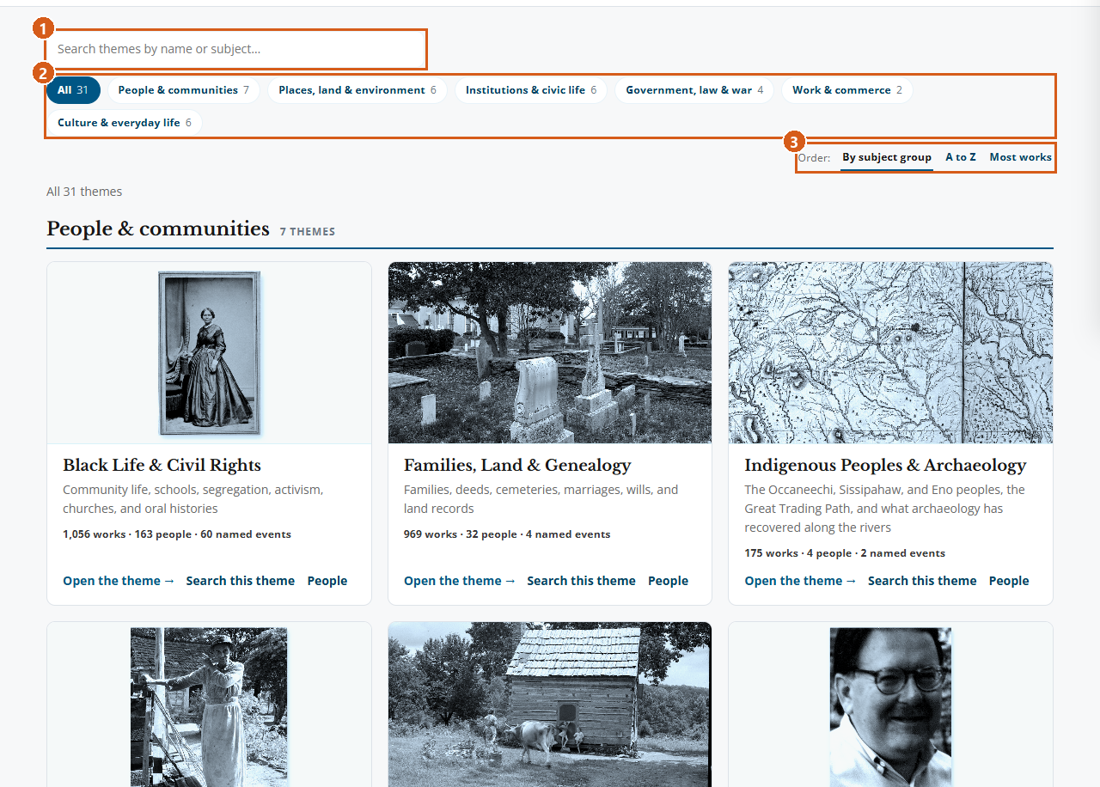
Themes gathers the county's history into subjects in six groups; search them by name, show one group at a time, or order them A to Z or by number of works. A theme page opens with "In brief", then its named events and storylines, its indexed works (with "Filter these works by material, period, or place"), its dated events and a map of its places.
Storylines lists every longer history the chronology tells, by the period it begins in, with "Find a storyline by name". A storyline page has "In brief", "The full story" in paragraphs, its events in date order (some marked "Approximate date" or "Needs research"), and a map of its places. "See these dated events in the chronology" opens them where you can filter further.
Numbered on the screenshot: 1 Search the themes · 2 Subject groups · 3 Order.
Historical records
Historical records gathers five collections made from the county's records: Mark Chilton's abstracts of the deeds from 1752 to the 1870s, the county court minutes (1752 to 1766 and 1777 to 1818), the wills of 1752 to 1893, the tax lists of 1755, 1779, 1780 to 1781 and 1790, and the records naming enslaved people from 1754 to 1867, with the marriages freed couples registered in 1866. Type a name once and send it to any of them. Use the historical records explains each collection and how to take what you find to the library.
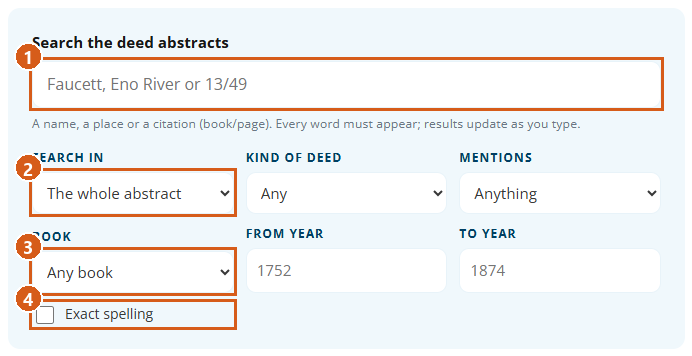
The deed search matches as you type. "Search in" limits it to the abstract, the parties or places; "Kind of deed", "Mentions", "Book" and the year boxes narrow it. It forgives small spelling differences (Faucet finds Faucett); select "Exact spelling" to match whole words. "Browse by book" lists every deed book.
The court minutes and wills search names, places and kinds of entry, with the same spelling help; browse the minutes by court term and the wills by will book. The tax lists search every year at once and open a year at the name, district by district.
The search of enslaved people takes a first name, a surname or both; most enslaved people are recorded by a first name alone, so add the enslaver's surname to find the records that name both. Browse the records by decade, or the 1866 marriages by surname.
A record page gives its facts and parties, the citation, links to the records it connects with (a deed and the court entry that proved it, a will and the records naming the people it bequeathed) and to the people's pages, and for a deed "See the deed book page at the Register of Deeds". An abstract is a summary: open the original before relying on a detail.
Numbered on the screenshot: 1 Search the deed abstracts · 2 Search in · 3 Book · 4 Exact spelling.
At OCPL
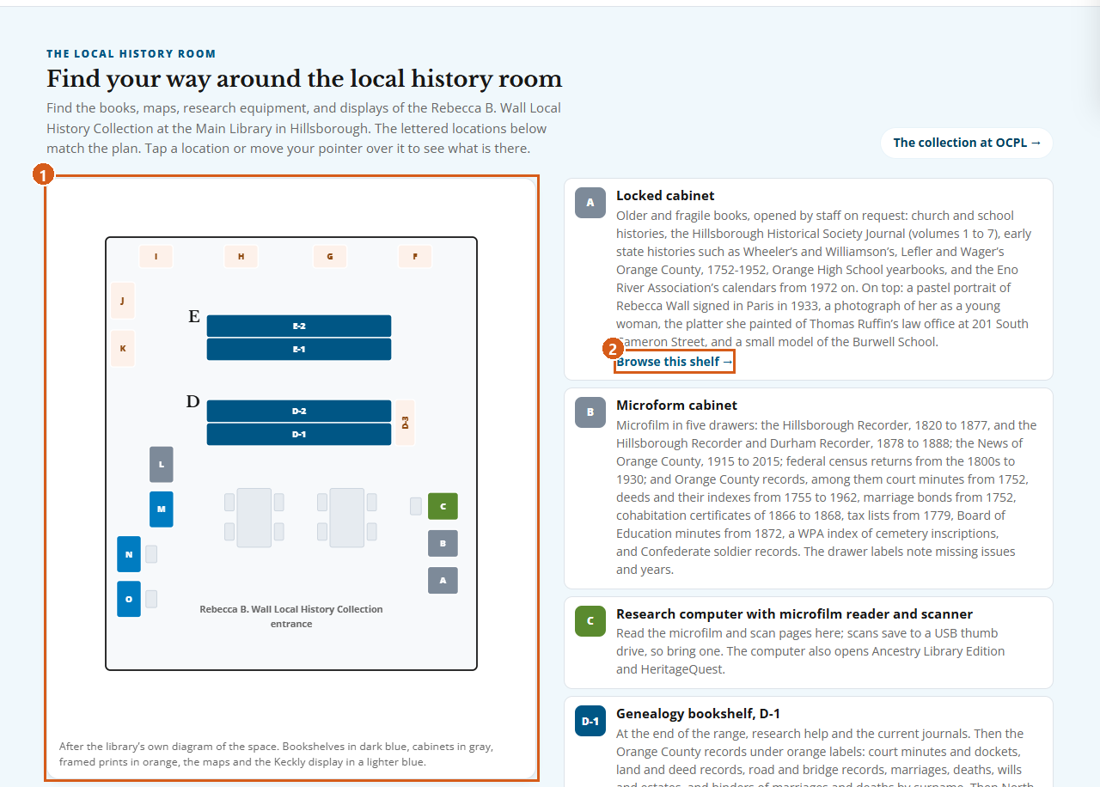
Local history at OCPL shows the Local History Room at the Main Library in Hillsborough. Tap a letter on the plan, or move the pointer over it, to see what is there; the key describes each spot, "What's here" opens fuller lists (the microfilm drawer by drawer, the family file surnames, the maps), and "Browse this shelf" opens that bookshelf's titles.
"Browse the full Wall Collection" lists the Rebecca B. Wall Local History Collection A to Z or shelf by shelf, in the library's call-number order, with its own search.
"Orange County works at OCPL" lists the indexed works the library holds.
Each row gives a description or catalog subjects, the call number and "View in OCPL catalog".
Numbered on the screenshot: 1 Plan of the room · 2 Browse this shelf.
Downloads
Four spreadsheets (CSV files) can be downloaded. Each opens in Excel, Google Sheets or LibreOffice.
The index: on Explore, open "How the index is made" near the foot of the page and choose "Download the index as a spreadsheet (CSV)". One row per indexed work: title, authors, year, publisher, ISBN and OCLC numbers, place and category codes, whether OCPL holds it with its catalog link, a free full-text link where there is one, and which libraries hold it. Filter it to what OCPL holds, or count works by decade.
The connections: just below, "Download the connections (CSV)". One row per link the chronology makes between a person and another person, a site or an event, with the entry behind it, its source and whether it has been rechecked. Use it to see who appears with whom, or load it into a network tool.
Search results: in Search Indexed Records, "Download results (CSV)" saves every work your search and filters find, not just the page on screen, in the same columns as the index. Set "Sort" to "Oldest first" first for a list in date order.
The chronology: at the foot of the chronology, "Download the full chronology as a spreadsheet (CSV)". One row per dated event and storyline: date, title, summary, places, themes, people, kind of event, source and each entry's own link. Count events by decade, or pull every entry for one town or person into one sheet.